Hi, I'm Shrav, a
UX designer with a research-first practice, 2 years across AR telehealth, social commerce, and accessibility design.
designerദ്ദി˶ᵔ ᵕ ᵔ˶) designer ♡
The brief might be right. It might be wrong. Research is how I tell the difference.
My design philosophy
If you're building something and need a designer who can work from brand to shipped product, let's talk!
Indian thrift didn't come from platforms like Depop, it grew on Instagram. Sellers build audiences through reels and drops. Buyers follow for the vibe as much as the clothes.
Drops go live → comments flood → DMs explode → sellers manually manage everything. It's chaotic. It's exhausting. And it works.
The challenge wasn't "how do we build an e-commerce app?" It was: how do we formalise this without killing what makes it work?
Sellers didn't need us, they already had functioning businesses. Contextual interviews, live drop observation, and competitor analysis confirmed it. That raised the bar immediately: any new platform had to make things meaningfully easier without breaking the behaviour that built their audiences.
Buyer needs: track drops across sellers without monitoring twenty accounts, get access through a fair process, and pay safely, not just a DM and a prayer.
Seller needs: schedule drops instead of managing real-time chaos, keep reels central, and handle high-value pieces with structure instead of first-DM-wins.
Rules vary by seller.
Return policies, payment methods, and buyer conduct are set individually, usually pinned in the bio or as a fixed post.
Stories as soft launches.
Items are posted on stories before dropping to gauge interest and informally test pricing.
Backup accounts are standard.
Most sellers maintain a linked backup because Instagram deletions are common and this is their primary income.
Drops are events.
Reels and story countdowns are used to build anticipation before a drop goes live.
Engagement-gated access.
Some sellers restrict drop purchases to users who commented on the announcement reel, using scarcity to grow their audience.
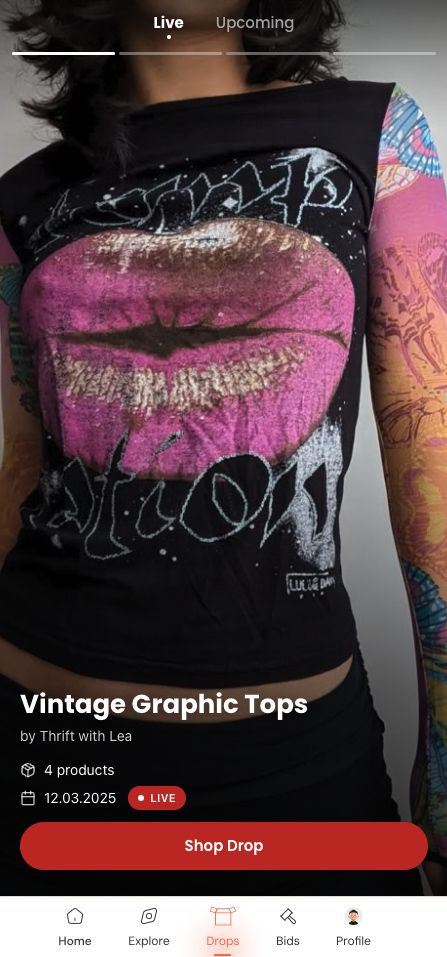
Before any screens were designed, the brand had to exist. Thrift My Drip isn't a neutral marketplace, it has a personality rooted in Indian Instagram drop culture: loud, playful, a little chaotic, and genuinely warm. The visual identity had to reflect that.
The colour palette, Statement Red, Golden Hour, Lemon Pop, Faded Tag, and Closet Black, was built around the energy of a drop moment. Statement Red carries urgency and excitement. Golden Hour and Lemon Pop bring the warmth of thrift-haul aesthetics. Faded Tag references worn labels and vintage provenance. Closet Black anchors everything.
Typography combines three typefaces: Newbery Sans Pro for headlines (structured but friendly), Lust for editorial moments (adds editorial tension), and Gopher for body text (legible and approachable). Together they create a system that can be loud when it needs to be and calm when clarity matters.
Supporting motifs, starbursts and elliptical patterns, were drawn from vintage sale signage and Indian bazaar aesthetics. Applied to social media templates, they give sellers a consistent visual vocabulary without constraining their individual voice. The system was designed to be handed off: sellers should be able to use it without a designer present.
Colour Palette
Statement Red
#C0392B
Golden Hour
#E8A838
Lemon Pop
#E8D84A
Faded Tag
#C8BFA8
Closet Black
#1A1A1A
Typography
The IA maps both user roles, Buyer and Seller, through their distinct flows. Shared authentication connects to parallel but separate navigation structures. The Seller dashboard is intentionally richer: analytics, drop scheduling, bid management, and shop admin. The Buyer flow keeps the homepage feed front and centre, with bids, orders, and profile as supporting tabs.
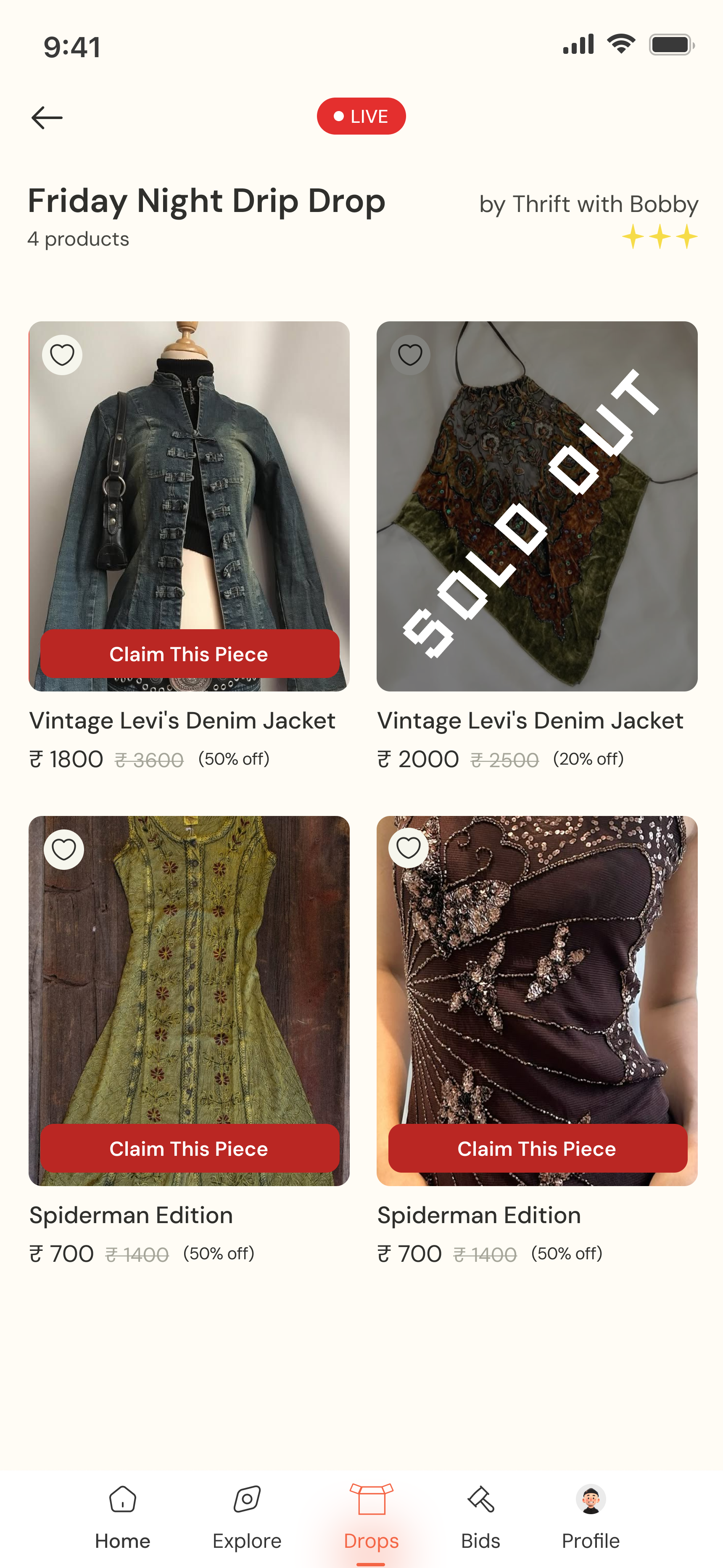
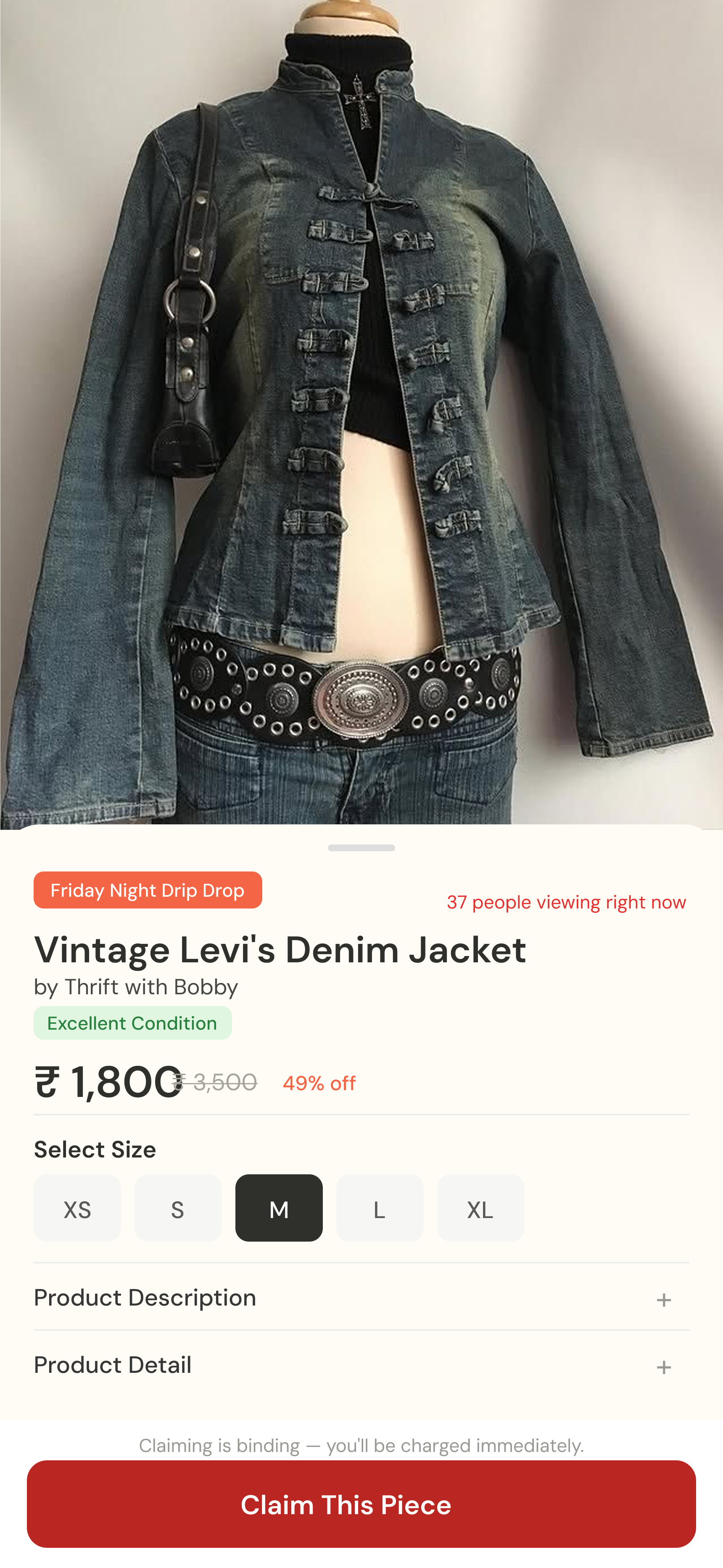
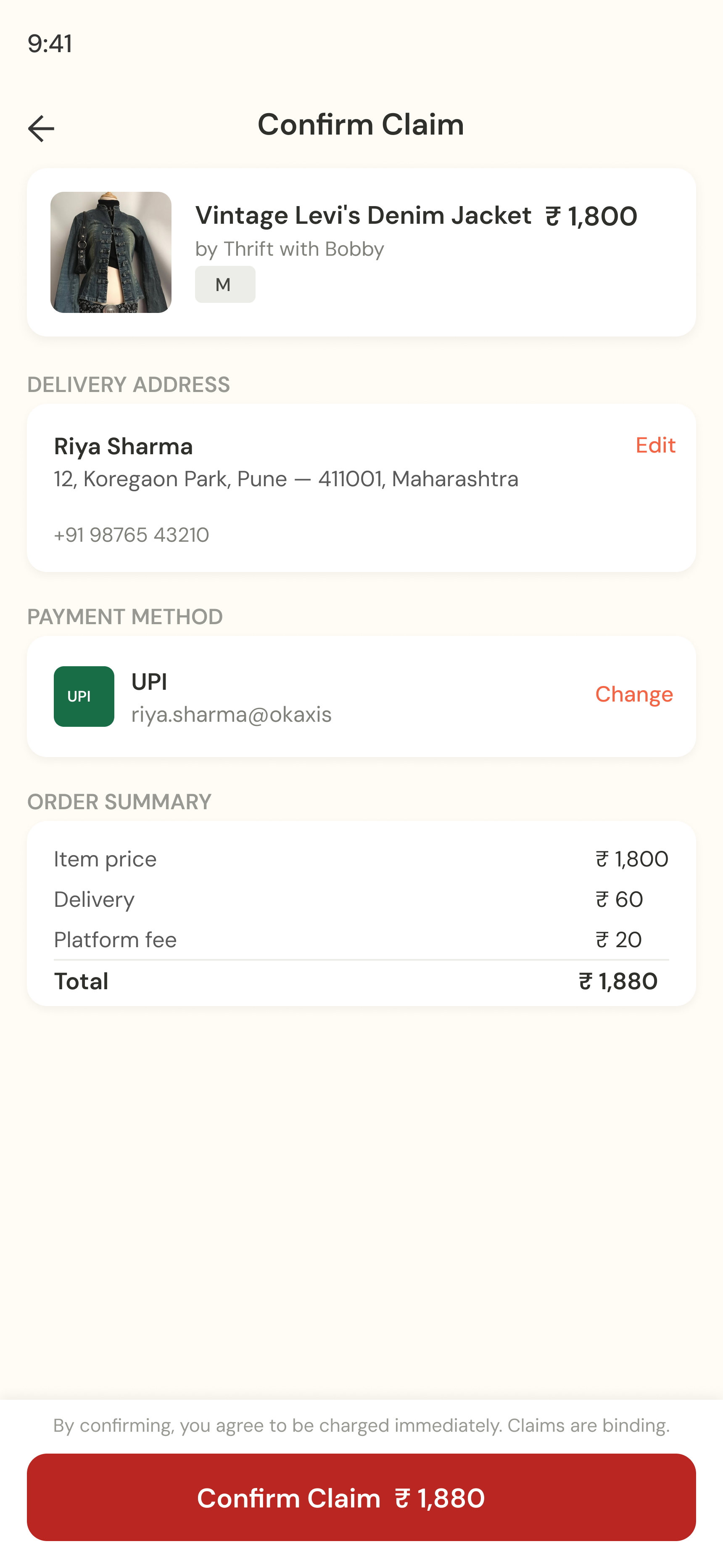
Sellers schedule a drop in advance, attaching a reel preview and setting a go-live time. Buyers get push notifications 30 and 5 minutes before. When it goes live, pieces are claimed with one-tap checkout, no cart, instant claim.
The countdown preserves the ritual of anticipation. The notification makes it fair. One-tap claim matches the urgency of the DM race, but without the chaos.

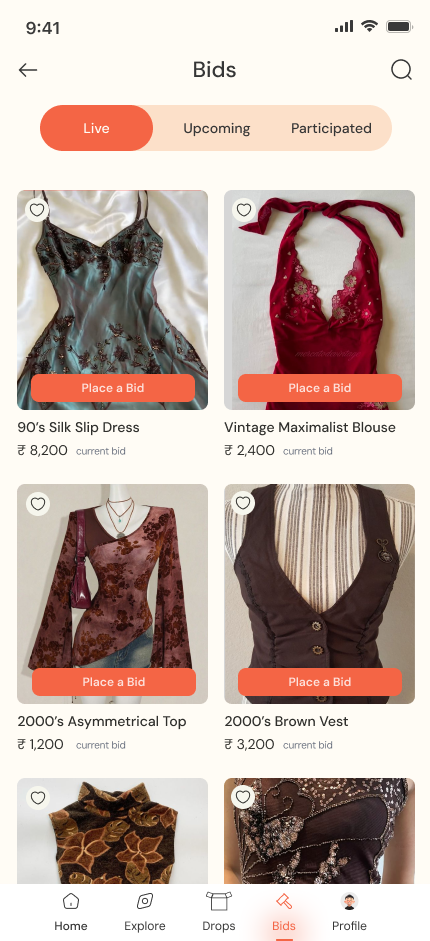
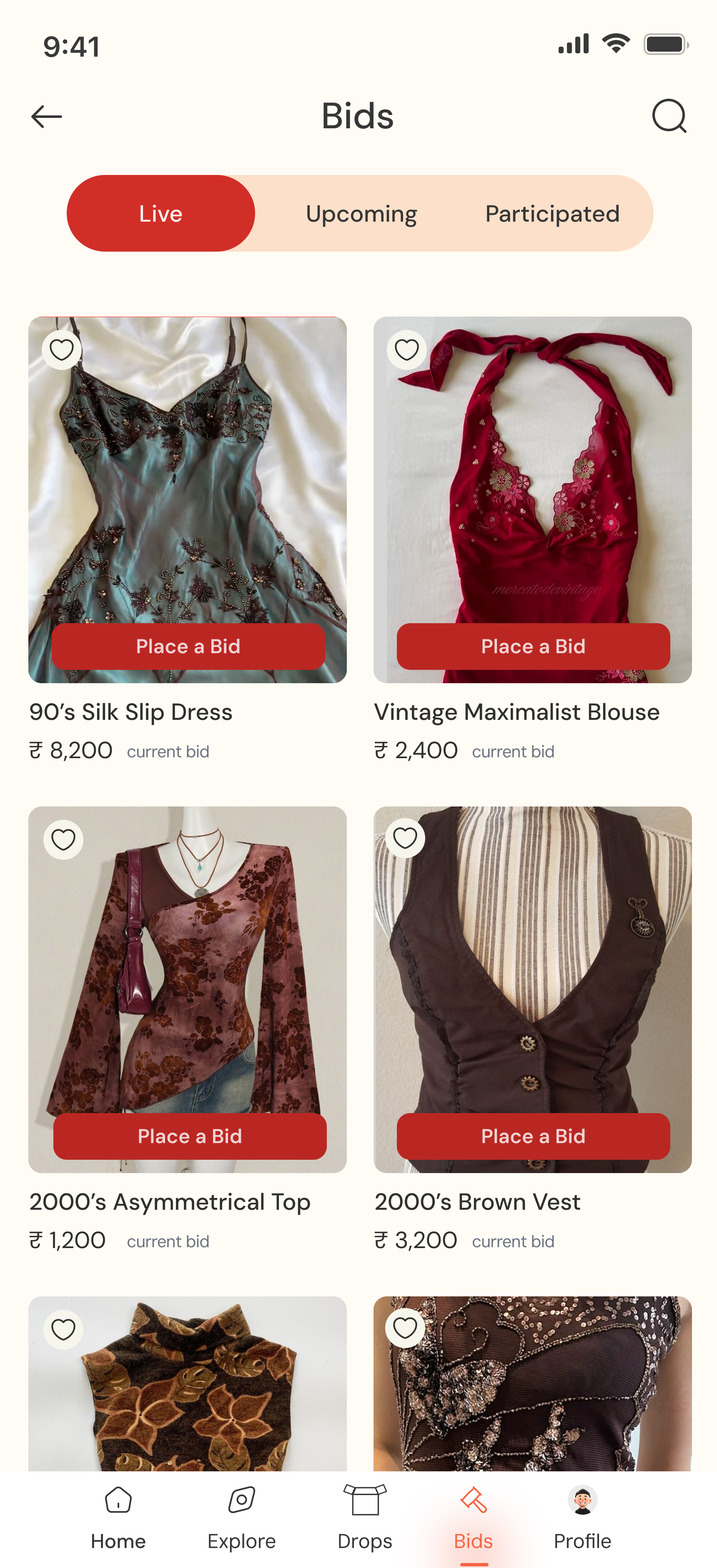
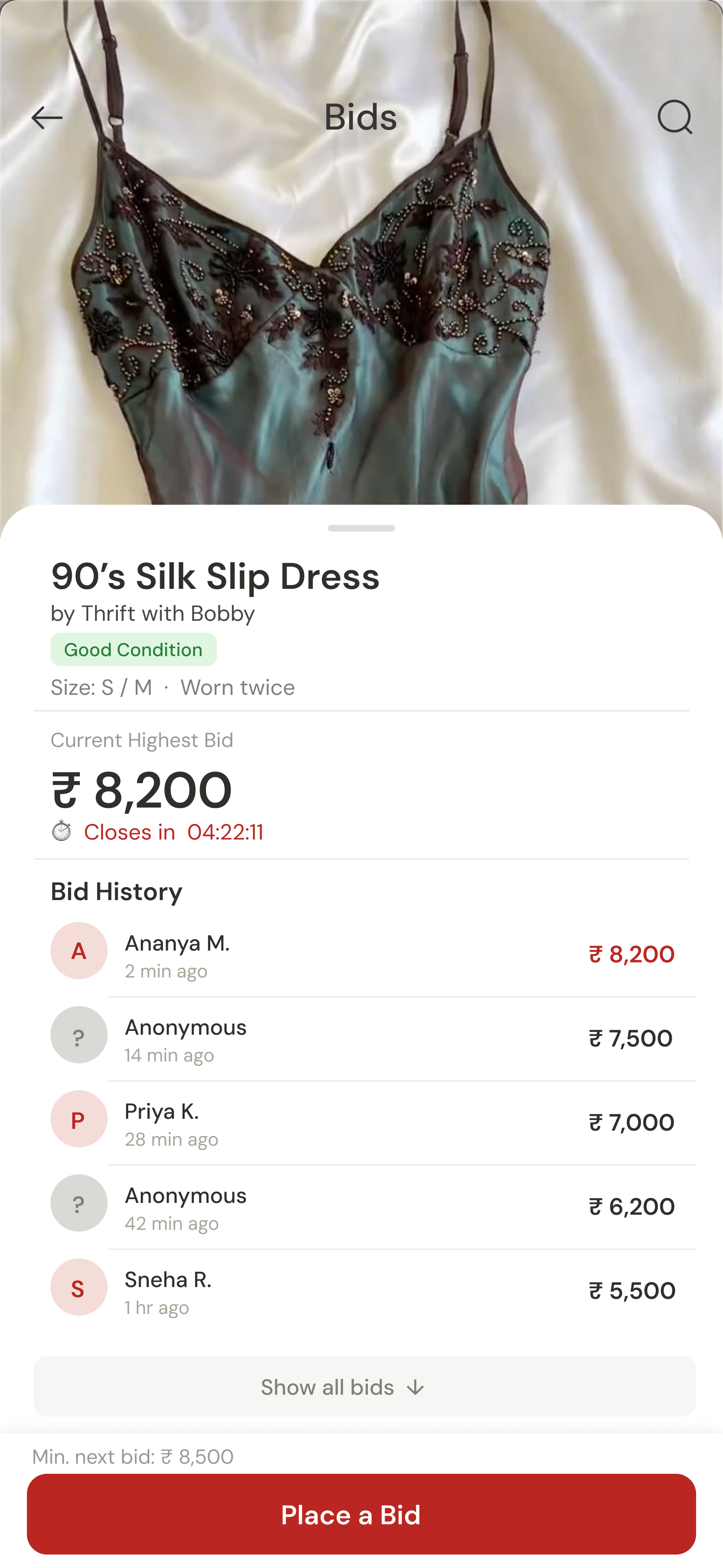
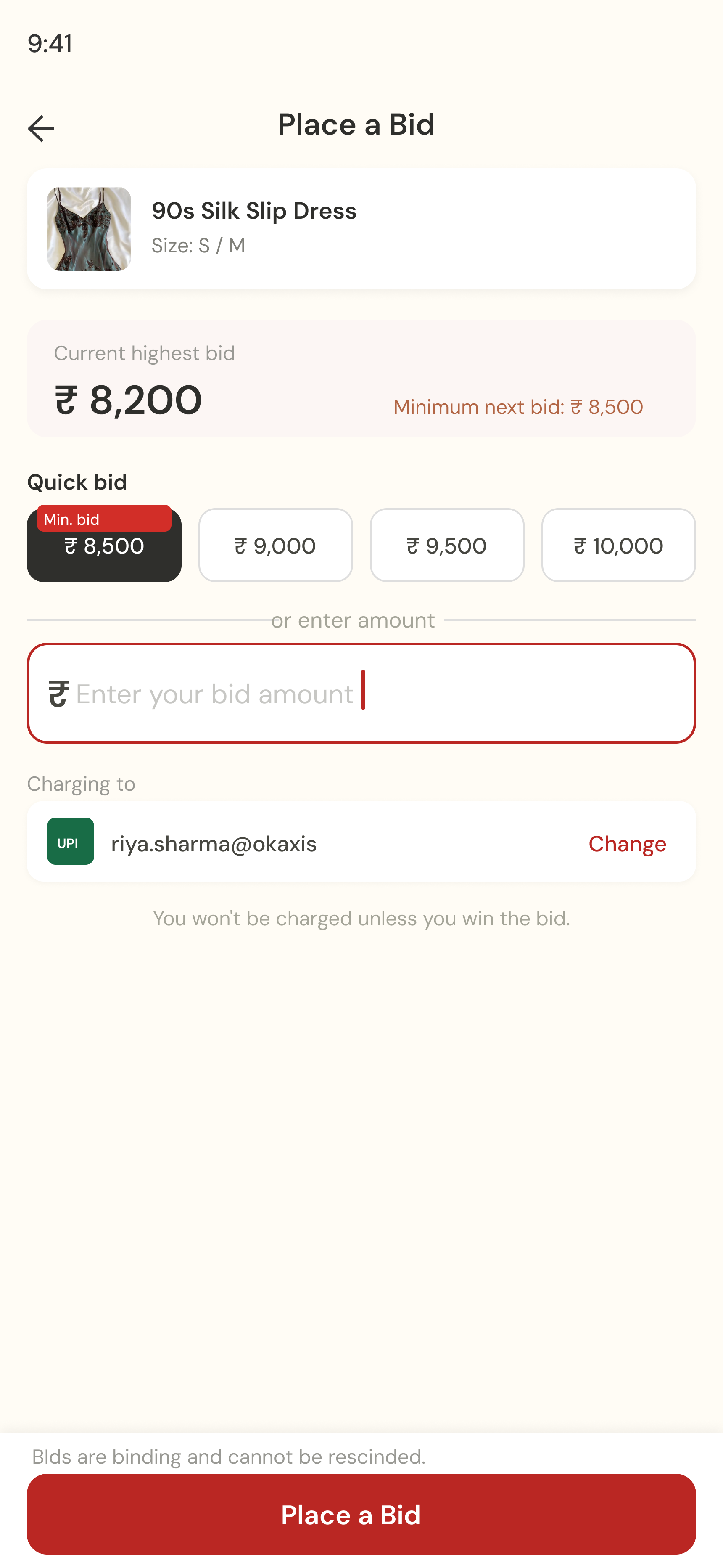
This feature went through the most iteration. The first version was eBay-style open ascending, everyone sees the running price. User testing revealed a trust problem: buyers felt anxious without context, unsure if the competition was real.
The solution was transparency at the right level: bid history, a clear end-time countdown, and a confirmation step after every bid. The anxiety came from information gaps, not the auction mechanic itself.

A web-based analytics and scheduling interface giving sellers visibility into drop performance, follower engagement, and order management. Designed against one question: does this make the seller feel more powerful, or does it make the platform feel more powerful?
Instant claim, not cart. A cart introduces hesitation, the same hesitation that kills the energy of a live drop. One-tap claim with an immediate confirmation mirrors the urgency of the DM race while giving buyers the confirmation they never had.


Open bidding changed to structured transparency. The initial eBay-style open ascending model was changed after testing revealed buyer anxiety. The solution wasn't a different bidding model, it was more information around the existing model: bid history, visible end time, post-bid confirmation.


User anxiety wasn't about auctions. It was about missing information. Once that clicked, every decision became about closing gaps, not adding features.
Cultural specificity isn't decoration. The brand system had to feel native to Indian Instagram, not sanitised or globalised. Working with local visual references (bazaar signage, haul aesthetics, drop-culture energy) taught me that specificity is the difference between feels made for you and feels adapted for you.
If I continued building, the focus would be seller analytics, which reels drove engagement before a drop, which price points cleared fastest. Better data makes sellers better at their craft. Better sellers bring better inventory. The flywheel starts with the seller.
Status: In active development (2025). Freelance commercial project, brand system delivered and signed off, product design in build.
The research, prototypes, and messier in-between work didn't make it here. Happy to walk you through it. Get in touch →
Cadis EziExpert connects a nurse wearing AR glasses to a remote doctor, real-time guided procedures from anywhere. The premise: expertise doesn't have to be in the room. It just has to be reachable in time.
I joined mid-project as the only UX designer on a dev-heavy team, no UX precedent, no clean slate. My job was to bring structure, clarity, and decision-making into something already moving, across four distinct user flows. It shipped. It's live.
AR Assistant (on-site nurse): hands-free, glanceable, zero tolerance for ambiguity. Cognitive load already at its limit.
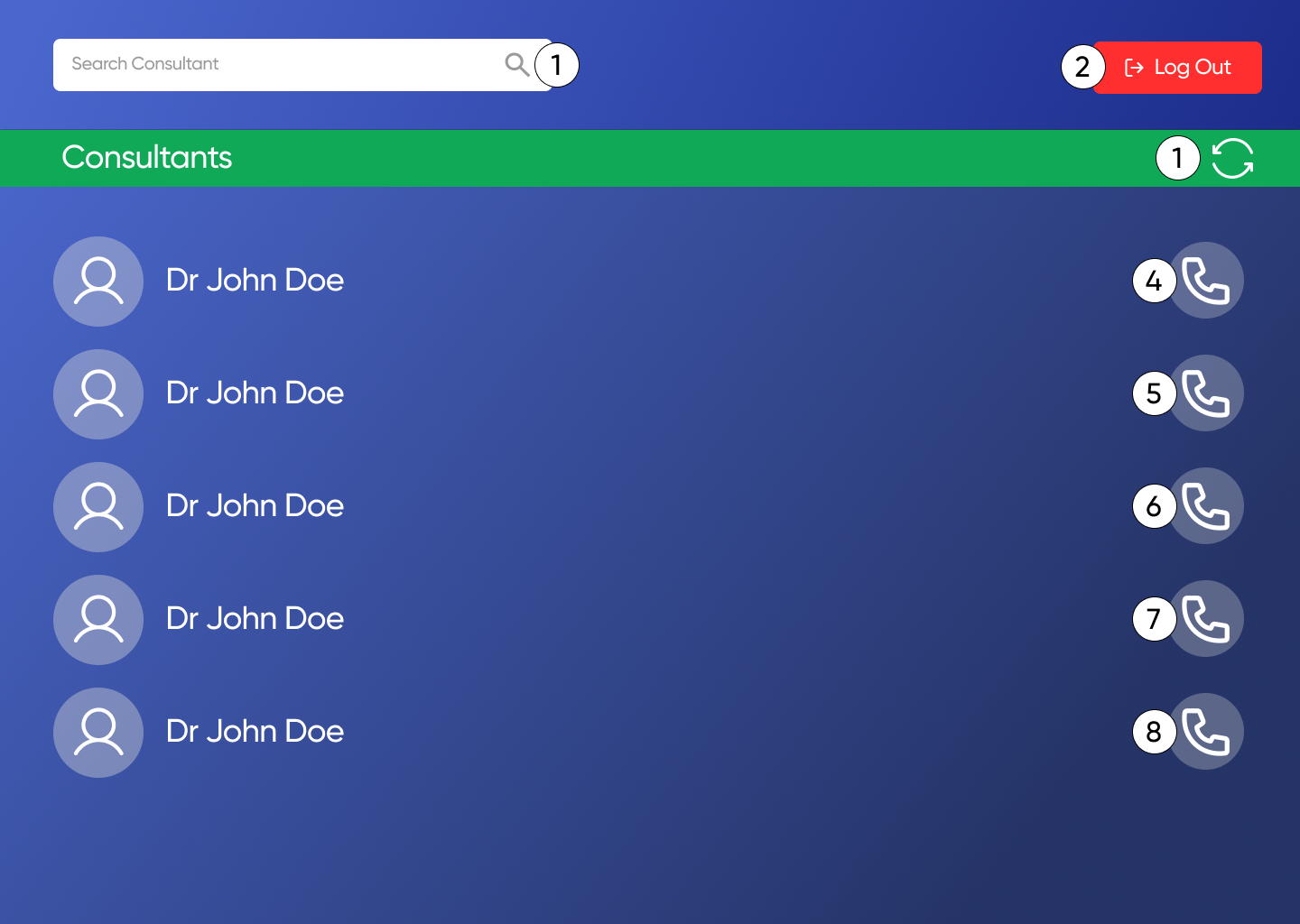
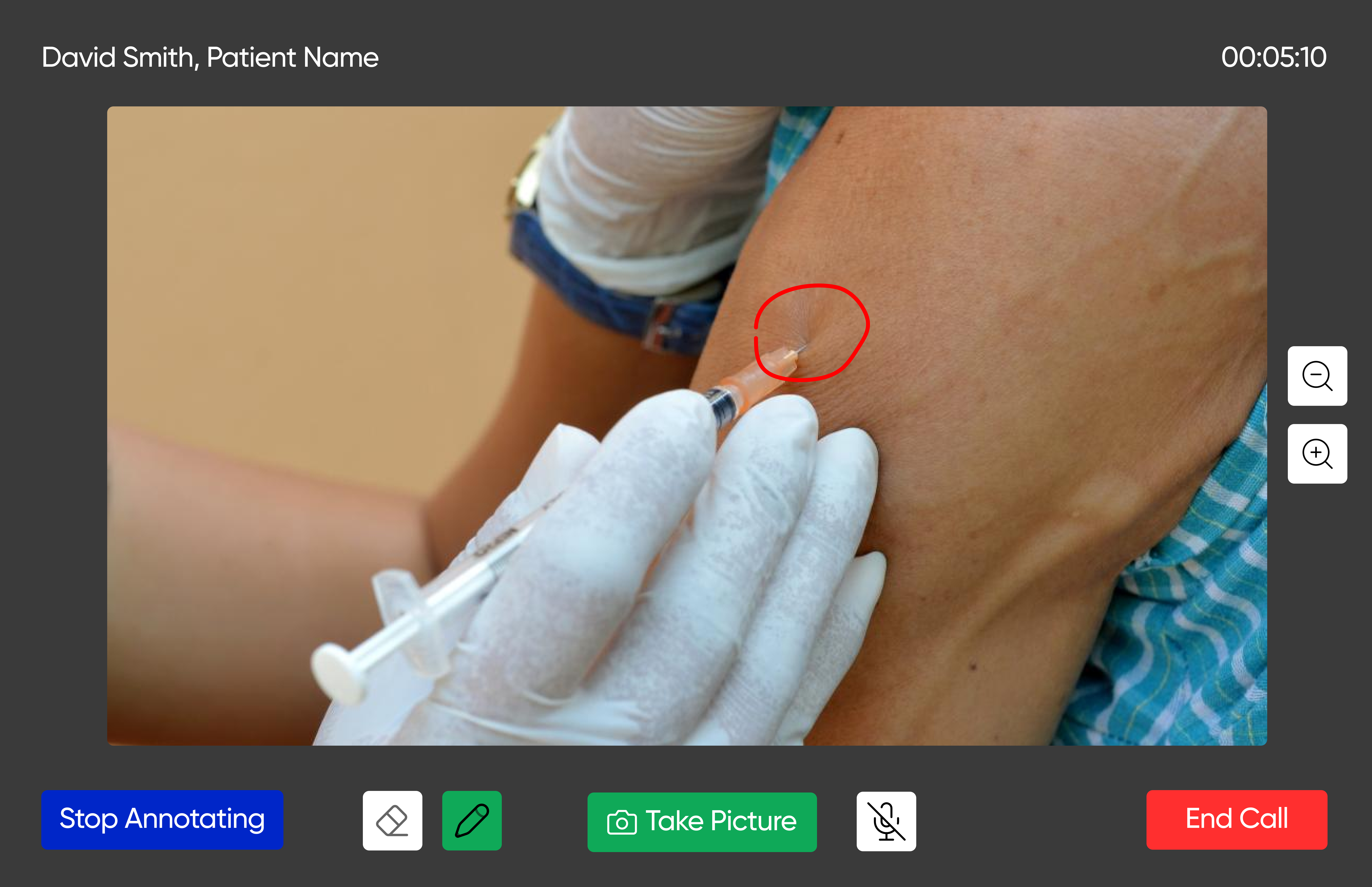
Consultant (remote physician): needs annotation tools, session recording, and precision communication across distance, under potentially poor network conditions.
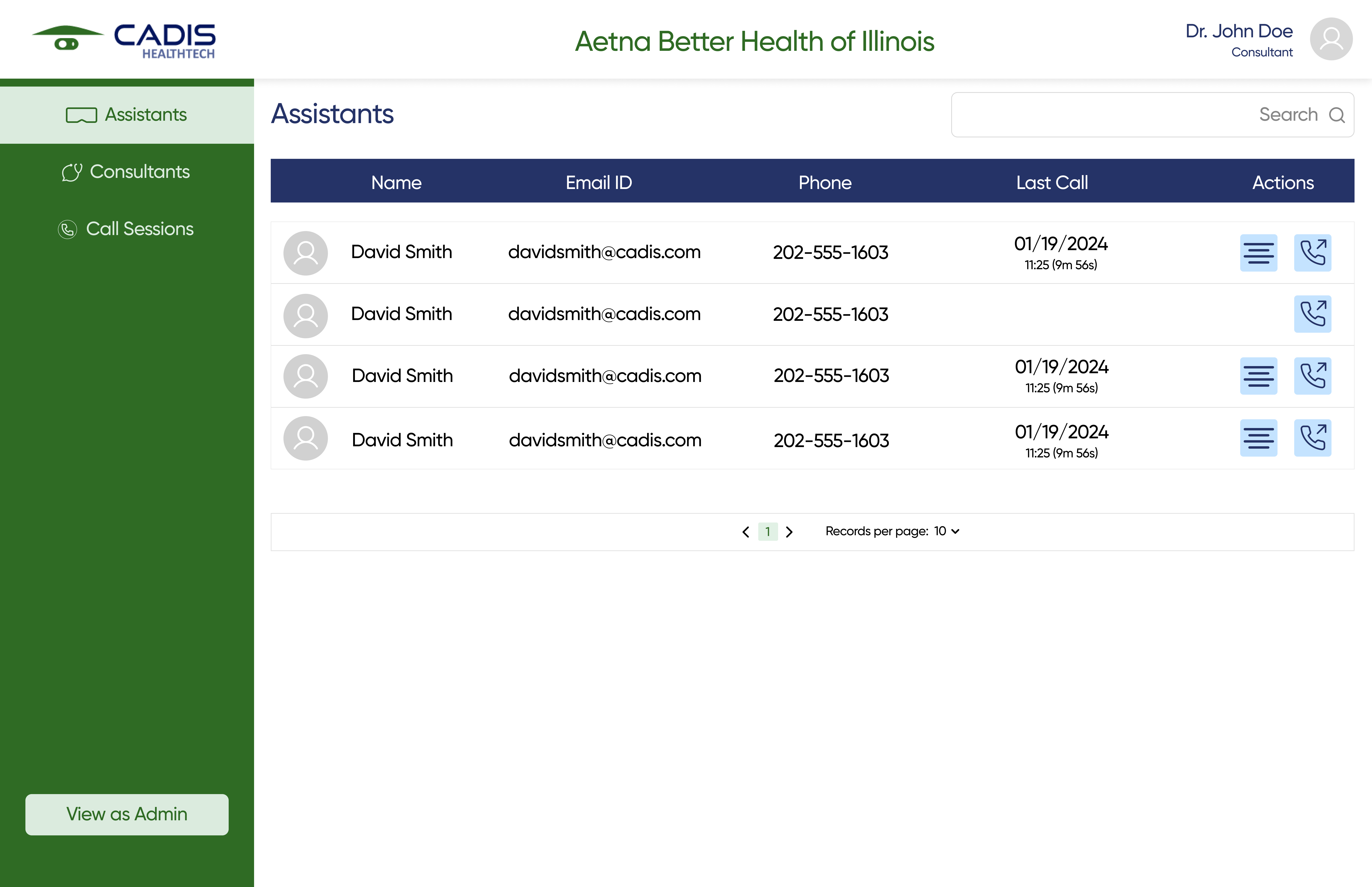
Org Admin: managing access and scheduling within a facility. Needs clarity and control without clinical complexity.
Super Admin: platform-level oversight across institutions. Compliance, accountability, data integrity.
These aren't roles with permissions. They're entirely different people, under entirely different pressures. One interface with permission toggles would have failed all four of them.
Each user role has a completely distinct IA, not a shared shell with permission toggles. The AR Assistant flow is the most minimal by design: one entry point, one active call screen, three actions. The Super Admin is the most expansive, managing organisations, subscriptions, and institutional data.
Joining mid-project meant the first research task was analytical rather than generative: understand what design decisions had already been made, why, and where the gaps were.
I started by researching the patient experience, which turned out to be the wrong starting point entirely. Patients in this system are not users of the platform. They're present during the procedure, but the platform is built for the people performing and supervising it. Recognising that mismatch early forced a sharper definition of who actually needed to be designed for: the nurse operating under procedural pressure, the remote physician guiding in real time, and the administrators managing access and accountability.
From there I ran a retrospective UX audit, mapping existing decisions against those user realities and clinical software heuristics. Secondary research covered AR in healthcare, telehealth UX patterns, and HIPAA compliance requirements, all used to pressure-test what was already built and identify where it fell short. I also spoke directly with nurses about performing procedures under verbal guidance alone, those conversations directly shaped two of the key feature decisions.
What the audit surfaced: the AR assistant flow was underdeveloped relative to the cognitive demands of the role. The consultant interface lacked annotation precision. The admin flows had no clear mental model separating org-level from platform-level oversight. These gaps became the brief I worked from.
The platform operates across two simultaneous environments, the AR glasses worn by the on-site assistant and the desktop dashboard used by the remote consultant. A single session requires both to be in sync at all times, with real-time video, annotation, and communication layered on top of a shared session state. Understanding how data moved between these surfaces was essential before any interface work could begin.
The admin layers sit above the session itself, managing access, permissions, and audit trails without ever intersecting with the live procedure flow. Separating these concerns structurally, so that administrative actions could never accidentally interrupt an active session, was one of the earliest and most important architectural decisions reflected in the design.
The hardest design surface on the project. Five constraints operating simultaneously: no touch input, everything glanceable mid-procedure, notifications that couldn't startle, UI overlaid on a live video feed, and no assumption that the nurse's hands were free.
We were working with Rokid AR glasses and could prototype and test in actual AR, not in a clinical setting but in a real hardware environment. What looks clean on a Figma canvas can be completely unreadable as an AR overlay during movement.

The original model for consultant guidance was verbal, the remote physician would talk the nurse through the procedure. When I spoke with nurses about this, it became clear that verbal instruction alone placed significant pressure on the assistant: interpreting spoken direction while performing a procedure leaves too much room for misunderstanding at exactly the wrong moment.
I proposed that the consultant should be able to draw directly on the live AR view, highlighting equipment, marking procedural steps, circling areas of concern. What the nurse sees in their glasses updates in real time. The team liked it but had hardware concerns about implementation. It shipped, though the input method remains imperfect: consultants annotate via mouse or trackpad on desktop, which is a reasonable approximation but not purpose-built. That's a known limitation, not a solved problem.

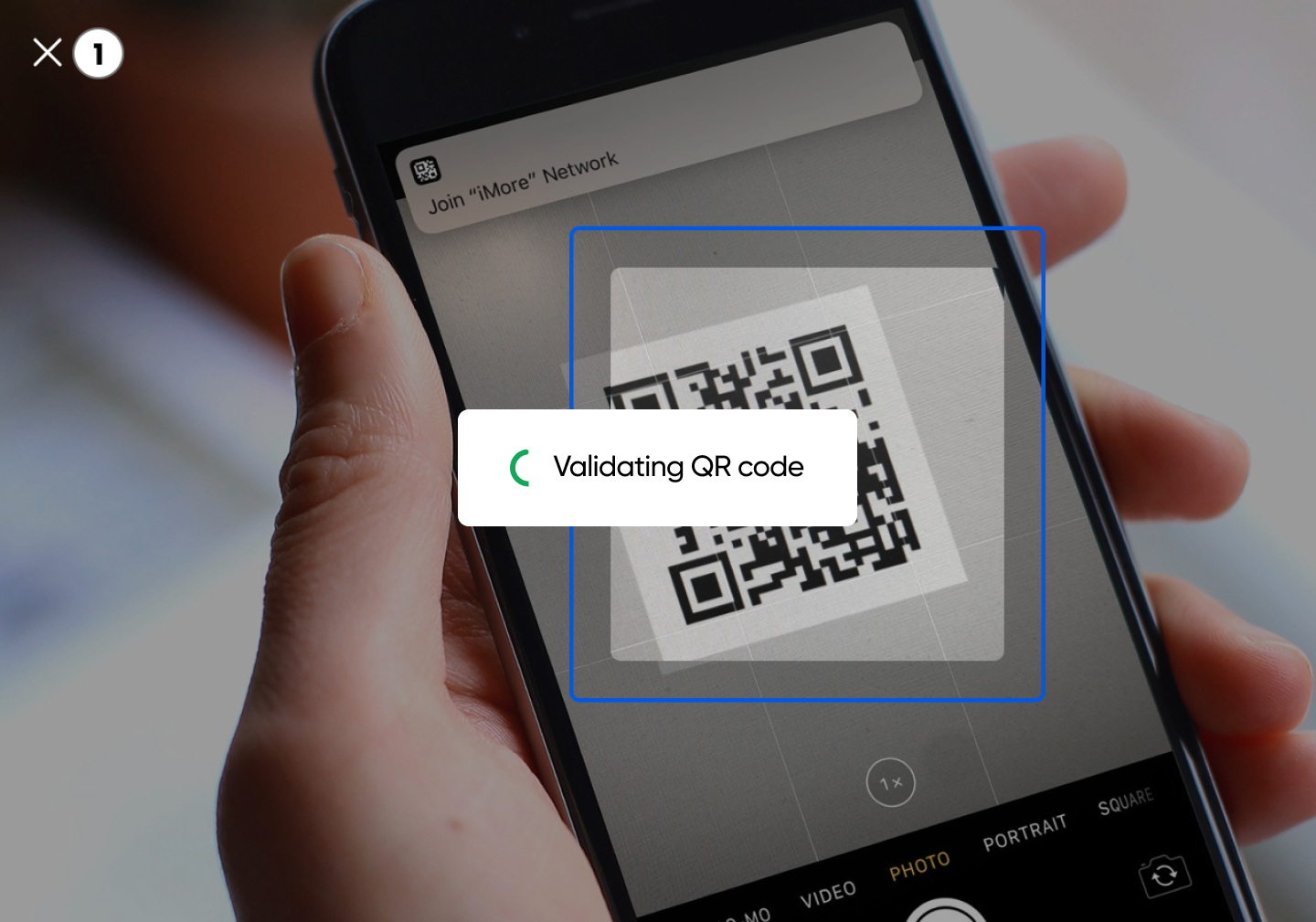
Connecting AR glasses to the platform via a single QR scan. No multi-step credential entry in a clinical environment where every second and every surface matters.

Every element was pressure-tested against one question: what happens if the nurse misreads this during a critical procedure? That constraint shaped the visual language entirely. High contrast, clear hierarchy, nothing on screen that doesn't need to be there.
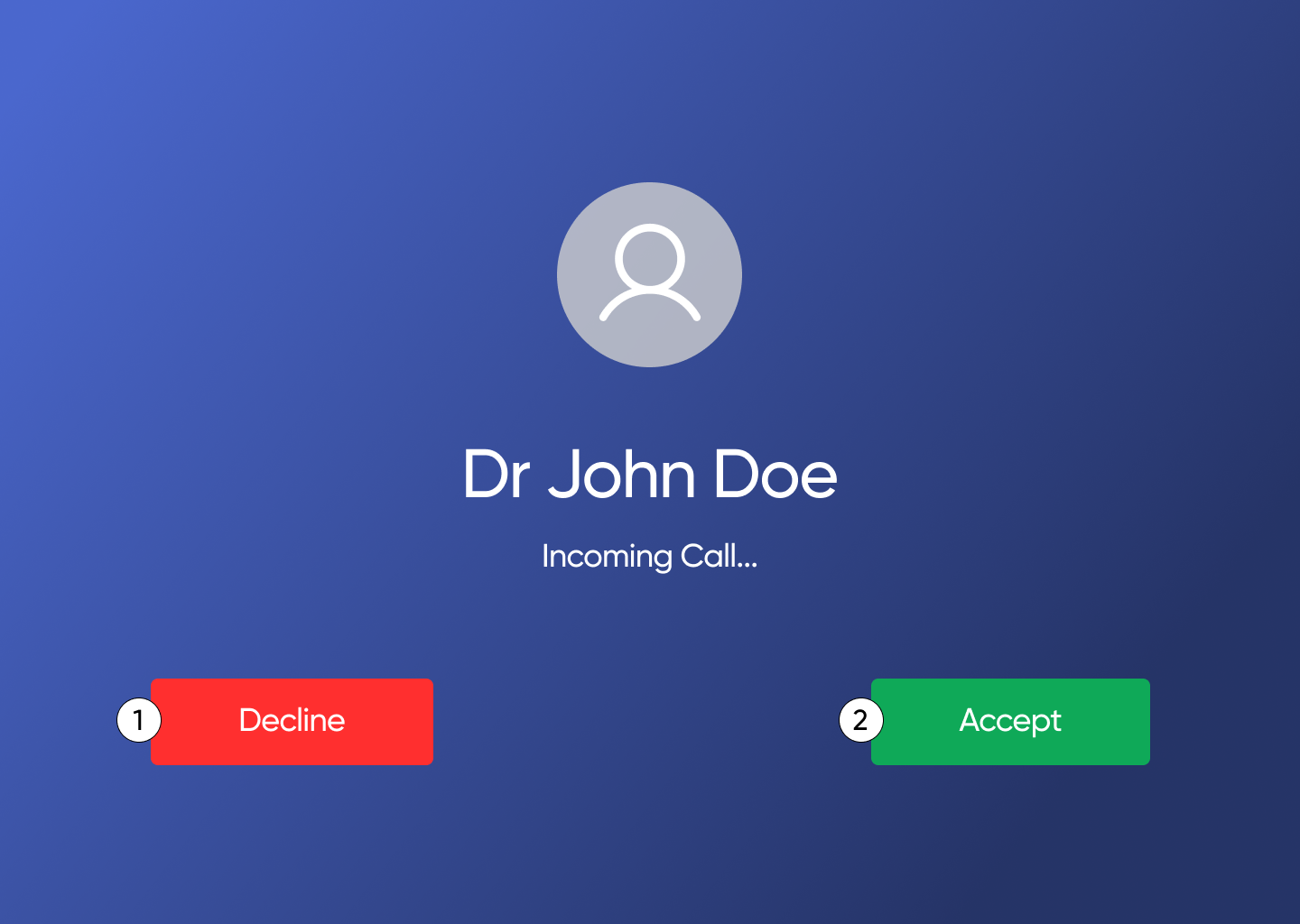
The incoming call screen was designed to feel immediately familiar, closer to FaceTime than to a clinical dashboard. Familiar patterns reduce the cognitive cost of a new tool in a high-stakes moment.
Two of the features I'm most confident were the right calls, live annotation and numbered voice commands, came directly from what I found while researching the actual users. Both required negotiation to get in, and both have real implementation constraints I can speak to honestly.
My initial instinct was to build something visually rich and information-dense. My manager pushed back, the desktop interfaces had to work under poor bandwidth and bad internet. Clinical environments are not controlled environments. Visual ambition had to give way to functional reliability. It was the right call.

My initial proposal for the AR assistant's voice interaction was conversational, the nurse could speak naturally to trigger actions, similar to how you'd interact with a voice assistant. The logic was familiarity. The problem was error rate.
In a clinical setting, the cost of misrecognition isn't inconvenience, it's a procedure going wrong. Natural language is ambiguous under pressure and in noisy environments. After working through the technical constraints and the stakes, I proposed a numbered system instead: each action on screen has a number, the nurse calls it out, the system confirms. It's explicit, unambiguous, and leaves no room for the system to misinterpret intent. The friction of learning a new pattern is worth it for the certainty it provides.

It was communication. Making design decisions legible to a manager without UX training, getting them respected through a developer review process, surviving handoff, that's a different skill from designing well in Figma. I was the only person in the room with a UX education.
Designing for degraded conditions was the most humbling part. The question isn't "does this work?", it's "does this still work when things go wrong?" You can't assume ideal circumstances.
Status: Shipped and live. Used across clinical sites. Specific deployment data is under NDA.
The research, prototypes, and messier in-between work didn't make it here. Happy to walk you through it. Get in touch →
The project began as a brief to help autistic children in India. The gap was real and well-documented.
Primary research changed the direction entirely. Interviews with parents, guardians, and therapists made one thing clear: the children have limited agency over their own care. The people who needed better tools were the caregivers, present for twenty-three hours of every day the therapist only sees one of.
My thesis mentors confirmed it: following the evidence, even when it meant scrapping months of prior framing, was the right call. AutiMate became a caregiving tool, not a child-facing one.
Autism therapy in India typically means speech and occupational therapy sessions aimed at building reception, expression, and pragmatic skills. Progress is slow by design, therapists must build rapport with a child before meaningful work can begin. Parents want to see results. The gap between expectation and pace is one of the most consistent stressors caregivers face.
Meanwhile, parents educate themselves through YouTube, Facebook groups, and whatever they can find, often in English, a language many are not fully comfortable with. The information exists. It just wasn't designed for them.
9 interviews were conducted,6 with parents or guardians of autistic children, 3 with therapists. Competitor analysis covered 11 existing products. None combined therapy tracking, therapist collaboration, localised content, and peer community in a single application.
The therapist interviews surfaced a specific tension that shaped the collaboration flow significantly: therapists were protective of their clinical notes. They weren't unwilling to share, but clinical notes aren't written for non-clinical readers. They require context to interpret, and without that context they risk causing more anxiety than clarity.
This meant the design couldn't simply be a shared document. It had to be a structured translation layer.
The primary persona that emerged from research was Priya, a mother in her mid-thirties, living in a tier-2 Indian city, managing her son's therapy schedule alongside full-time domestic responsibilities. She is deeply invested in her child's progress but has no clinical background. She navigates between WhatsApp groups, YouTube videos, and therapist visits, stitching together information from sources that weren't designed for her.
Priya is not a passive user. She tracks everything, in notebooks, in voice notes, in her memory. What she lacks is a system that translates clinical progress into language she can act on, in a language she's fully comfortable with. She doesn't need more information. She needs the right information, structured around her role, her time constraints, and the emotional weight of what she's managing every day.
The IA challenge was building a structure that felt simple under cognitive load while housing genuinely complex functionality. Hub-and-spoke navigation with a persistent bottom nav: the most important features are always one tap away, regardless of where you are in the app.
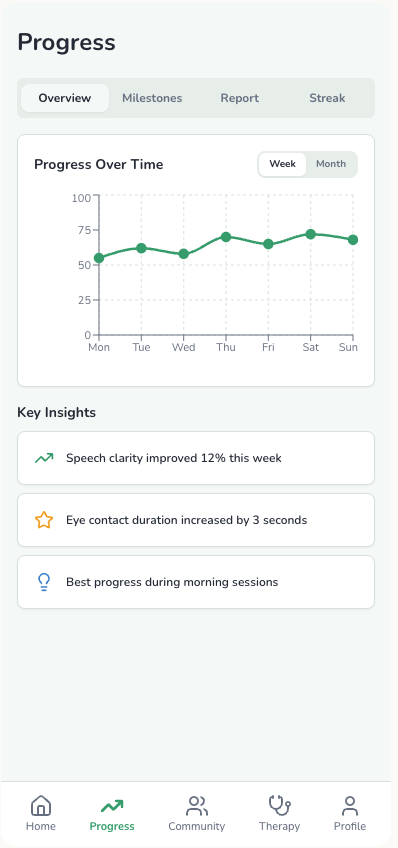
Session summaries, progress visualisations, milestone markers, and upcoming reminders. Designed for caregivers who are often distracted, emotionally worn, and time-poor. Large type, clear hierarchy, no clinical jargon.

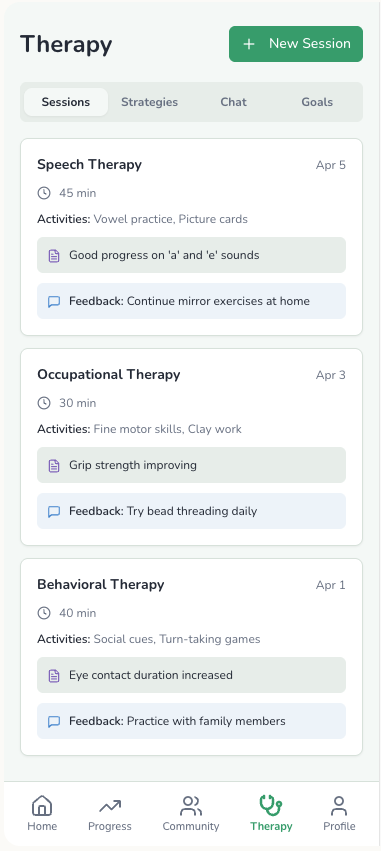
Therapists write structured session summaries, not raw clinical notes, and approve what gets shared before it's visible to the caregiver. The caregiver sees a simplified view with milestone updates and actionable instructions for home. The therapist retains full clinical detail on their side. Both see what's appropriate for their role.
Testing revealed an honest limitation: caregivers found it genuinely hard to keep the app updated consistently. The mental load of caregiving is already high. Any feature that required regular data input had to be as frictionless as possible, or it wouldn't be used at all.

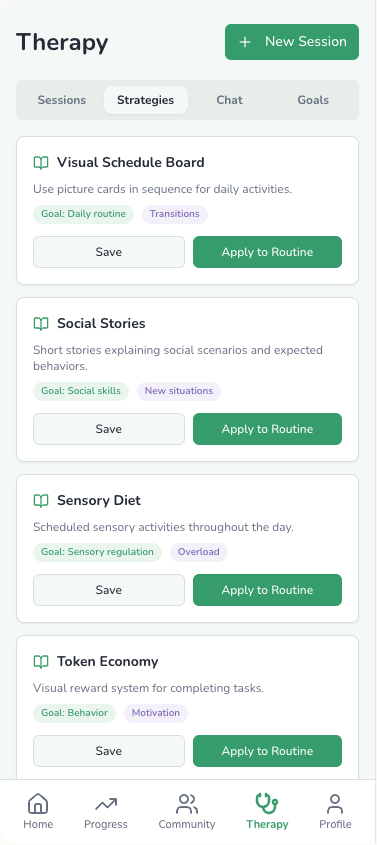
Evidence-based strategies and therapy guidance available in regional Indian languages. Curated for cultural context, not just translated.

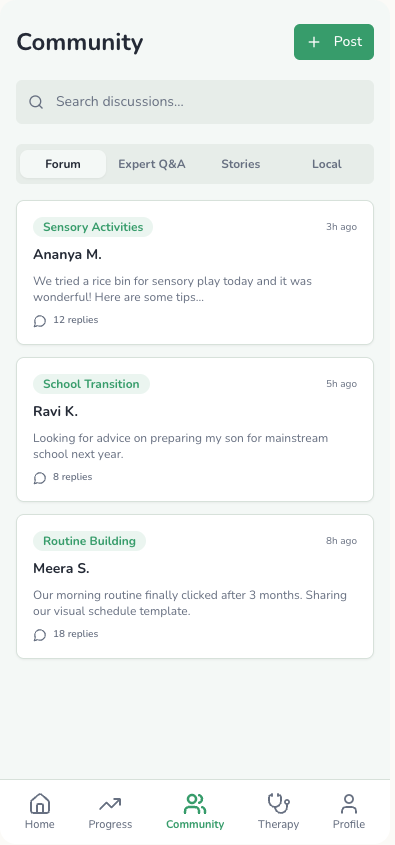
A moderated forum overseen by autism care experts. Peer support was consistently described as one of the most important resources in a caregiver's life, and consistently missing from every existing app in the competitor analysis.

Palette. Warm yellow-green, deliberately encouraging, not medical. Caregivers don't need an app that looks like a hospital interface. The colour choices were intentional: the emotional register of the product matters as much as the information architecture.
Navigation. Hub-and-spoke with a persistent bottom nav. The most important features are always one tap away, regardless of where you are in the app. No deep hierarchies. No dead ends.
Typography. Large and legible throughout. Caregivers are often reading on small screens, in difficult moments, with their attention divided. Type size is an accessibility choice, not an aesthetic one.
The collaboration model. The decision to pivot from shared notes to therapist-authored summaries wasn't a compromise. Trying to make raw clinical notes legible to non-clinical readers would have required either oversimplifying the clinical content or overwhelming the caregiver. The summary model respected both users' realities.
The biggest decision on AutiMate wasn't a UI decision. It was letting research prove me wrong, and following it anyway. I stopped designing for the person I assumed needed help and started designing for the person the evidence said actually did.
That reframe, from child to caregiver, happened because I was willing to let primary research contradict my initial brief. It's the thing I'd point to first if someone asked what this project taught me about research-led design.
The community feature, though the most requested, is also the hardest to get right at scale. Moderation, ensuring the forum is safe, accurate, and genuinely supportive, is a product strategy problem, not a design problem. That's the next version of this project.
Status: Thesis project (2024). Not commercially launched, presented to a jury panel at Symbiosis Institute of Design.
The research, prototypes, and messier in-between work didn't make it here. Happy to walk you through it. Get in touch →
TenderGenie is an AI tendering tool built for EPC and engineering teams, the people who spend their days reading 300-page RFPs, extracting scope, comparing revisions, and deciding whether a bid is worth pursuing. The problem isn't that they lack information. It's that the information is buried, inconsistent, and slow to process.
My role was research and interface design for an early-stage product at Datasmith AI. I joined when the product was still forming, before the interface had settled, and worked across user research and design to help shape what it became.
EPC (Engineering, Procurement, Construction) teams routinely respond to tenders that run into hundreds of pages. Scope extraction, revision comparison, and bid/no-bid decisions all happen under time pressure, often with multiple tenders running simultaneously.
Existing tools either automated the wrong things (document generation, not analysis) or required too much manual setup to be genuinely useful for the teams doing this work every day. The opportunity was to design something that fit into how procurement teams actually work, rather than asking them to change their workflow to fit the tool.
Research focused on understanding the tendering workflow end to end, where time was lost, where errors crept in, and where a well-placed intervention would actually change outcomes. Competitive analysis mapped where existing tools fell short for EPC specifically. Secondary research covered procurement workflows, RFP analysis patterns, and the specific constraints of engineering bid teams.
The clearest finding: the bottleneck wasn't writing the bid. It was reading and understanding the RFP accurately enough to make a good bid/no-bid call, and doing that fast enough to be competitive. Any interface had to serve that decision first.
The interface was designed around the core workflow: upload a tender document, get structured analysis out, scope extraction, revision comparisons, key clauses flagged. The visual language stayed dense and information-forward, matching how procurement professionals expect data tools to look and behave.
Design decisions prioritized legibility under cognitive load: consistent hierarchy, scannable outputs, and clear differentiation between AI-generated content and source document references, so users could trust what they were seeing and verify it quickly when needed.
The hardest design problem on this project wasn't the interface, it was trust. Procurement decisions carry real financial weight. An AI that confidently surfaces the wrong scope clause doesn't just create extra work, it creates liability. Every design decision had to account for that: how do you present AI analysis in a way that invites verification rather than blind acceptance?
Working embedded in a sales-cycle context, where the product was being demonstrated to potential clients while still being built, also shaped how I thought about early-stage product design. The interface had to work as a proof of concept before it worked as a shipped product.
Status: Commercial product, Datasmith AI. Live and in active use. Specific client data is confidential.
I can walk you through the research and design process in more detail. Get in touch →
UX and brand designer based in Pune. I design for how people actually behave, not how we expect them to.
I default to research when things get unclear, especially in early-stage products where the problem itself is still forming.
Under pressure, I ask more questions, instead of fewer. I push back when something doesn't hold up, and I get obsessive about edge cases, because if it doesn't work there, it doesn't work at all.
My process is messy. My thinking isn't. I'll explore widely, duplicate relentlessly, and work through rough, unpolished screens, then bring structure once the direction is clear.
I'm analytical, but I'm drawn to expressive systems. I like research that gets messy, and interfaces that don't.
Outside of product work, I run Ahikuro Studios: sculpture, resin, jewellery. It's where I work without constraints, think with my hands, and reset.
Experience